
How does the OGO cache work?
The OGO Cache is “Origin-Driven.” This means that the origin server provides instructions to the cache by using combinations of HTTP headers such as Cache-Control in its responses to HTTP requests. These instructions allow the OGO Cache to store and retain the delivered objects for a specified period of time. Its operation complies with RFC 7234.
When the cache is authorized to store an object but no retention time limit is specified by the origin server’s directives, the object may be retained for up to 24 hours.
The OGO cache has several features that optimize its efficiency within the framework of the RFC:
Set-Cookie headers prevent caching unless an explicit Cache-Control directive is specified that enables caching. In this case, the Set-Cookie headers are removed.
Vary headers of the types
*, cookie, user-agent, and refererprevent caching.
Enable caching on your website
Prerequisites: The site must be in Advanced mode, and the cluster on which it is provisioned must support caching.
In your site's settings, under the “Cache / CDN” tab, simply enable caching. Caching will be enabled across your entire site.

Choose not to cache certain paths
In your site's settings, under the “Access Control” tab, you can disable caching for a specific part of the site. To do this, create a new rule and add the paths where you want to disable caching (in the example, “/api”):

Clear the cache for certain paths
In your site's settings, under the “Cache / CDN” tab,
you can clear the cache for paths matching the given PCRE2 regular expression.
Examples:
/static/.* will clear all items under the /static/ path
.*.css will clear all files ending in .css (regardless of the path)
/(images|css|js)/.* will clear all items under the paths /images/, /css/, or /js/
Note: Clearing the cache takes effect immediately on the OGO cache as well as the CDN if the option is enabled.
Check the effectiveness of your cache
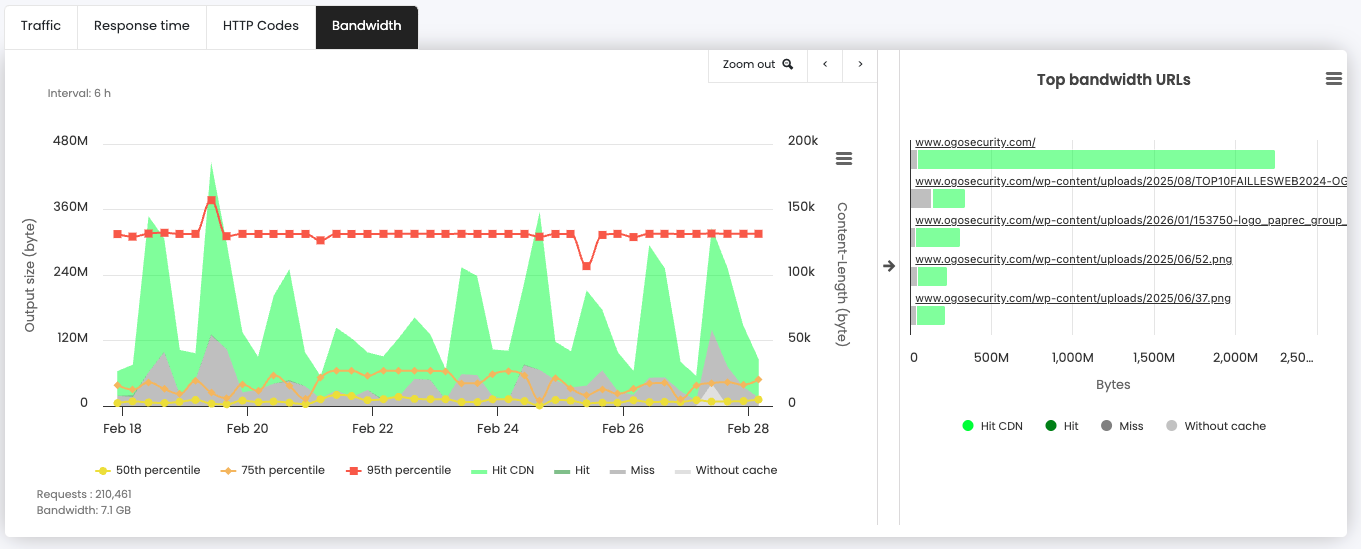
In My Logs, Bandwidth graph tab, you can visualize the caching rate, and the saved bandwidth.
HIT (Green)means that the cache service responded to the request without soliciting the origin server.
MISS (Grey) means that the cache service was requested by the request, but that the corresponding object was not found for one of the following reasons:
- Object not cacheable
- Object cacheable but expired or unknown.