

In My Logs, you can browser your logs for a maximum duration of one month. It can helps you identifying how your site is consulted, how is it attacked, why does OGO decided to flag this request has suspicious or blocked .etc
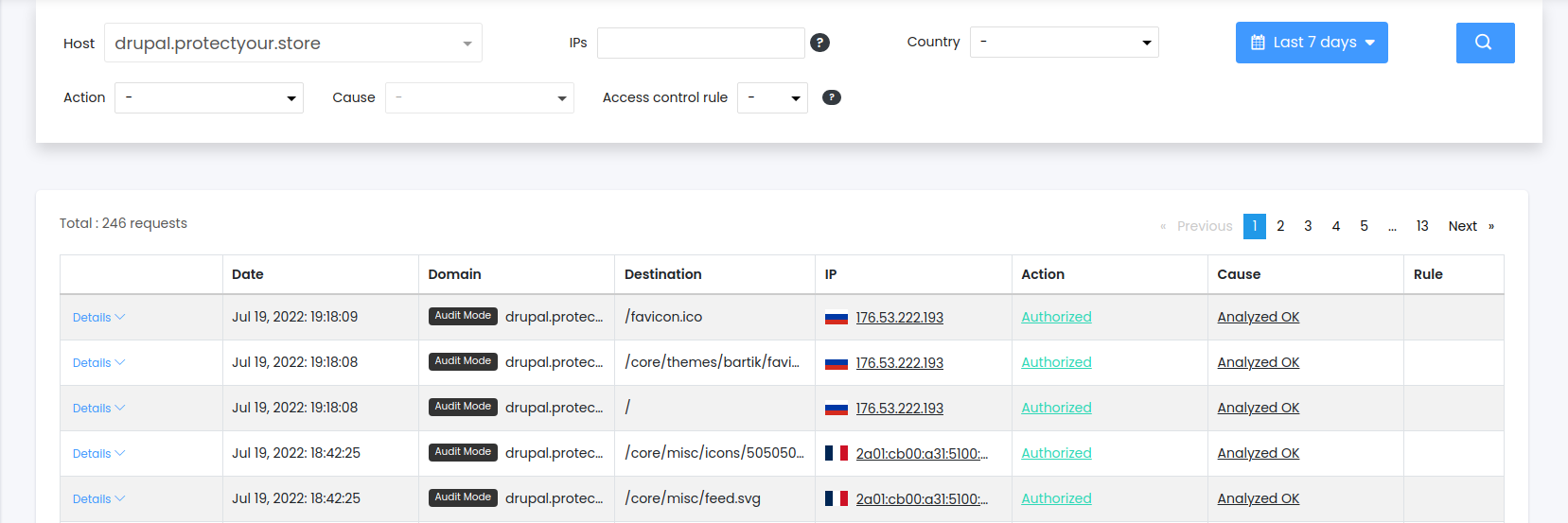
In the top bar :
Host : you can either choose a summary of your sites or one specific site.
IPs : you can filter one or multiples IPs or masked subnets here, semi-column separated.
Country : you can filter by country
Action & Cause : action and reason that took IA
Authorized : request has been forwarded and no penalty has been apply to the IP
Analyzed OK : request analyzed and IA didn't find anything suspicious
Pass-through by rule : request matched a Access control rule set to Pass-through
IP Exception : IP is in IP Exception
URL Exception : URL is in URL Exception
Suspicious : request has been forwarded but a penalty has been apply to the IP because IA has analyzed it and found suspicious content
Blocked : request hasn't been forwarded
Analyzed KO : IA decided to blocked the request because of malicious content / successive suspicious content in past requests.
Geo-blocked : country is blocked
Blocked by rule : tried to access a URL protected by an Access control rule which does not contains this IP
Access Control rule : you can filter by Access control rule matching (only available with a specific site filter)
Time filter : you can specify a begin date & hour, and an end date & hour.
Search button : triggers logs loading according to the filters. Note that modify filters auto-reload logs.
In each line :
Details drop-down allows to see more about the request. Note that request body aren't shown for confidentiality reasons.
Date : UTC+02 request timestamp
Domain : the concerned domain
can contains a "Audit mode" badge, specifying that the site is in Audit mode
can contains a "R" badge, meaning the URL followed a Rewrite Rule
Destination : request path, without query parameters
IP : contains IP and its country flag. Clicking on the flag filters on the country, clicking on the IP filters on the IP, and clean others filters
Action : action that took IA. Note that for sites in Audit mode, "Blocked N/A" means "Not applied". Clicking on the action filters logs only with this action. It does not clean others filters
Cause : reason that led IA to took this action. Clicking on the cause filters logs only with this action and cause. It does not clean others filters
Rule : Access Control rule matching. Clicking on the access rule number filters logs one this access rule, and clean others filters